

Big G Creations
Public Download
M365 GraphUI
⬇️ Download v3.0 (Windows)
• 158.8 MB
Need another version or OS? Click the version pill above.
Screenshots Gallery
 🔍 Expand
 🔍 Expand
Description
M365 GraphUI is a modern, enterprise-grade desktop management suite for Microsoft 365 administrators and Managed Service Providers (MSPs). Built on Microsoft Graph and PowerShell 7+, it consolidates tenant user provisioning, domain email security verification, tenant MFA compliance auditing, and one-click Conditional Access policy deployment into a single, lightning-fast application.
Whether you are managing a single organization or administering hundreds of customer tenants under MSP/GDAP delegated access, M365 GraphUI eliminates repetitive admin portal tasks, guarantees standard naming and security rules, and audits tenant security posture in seconds.
Key Highlights:
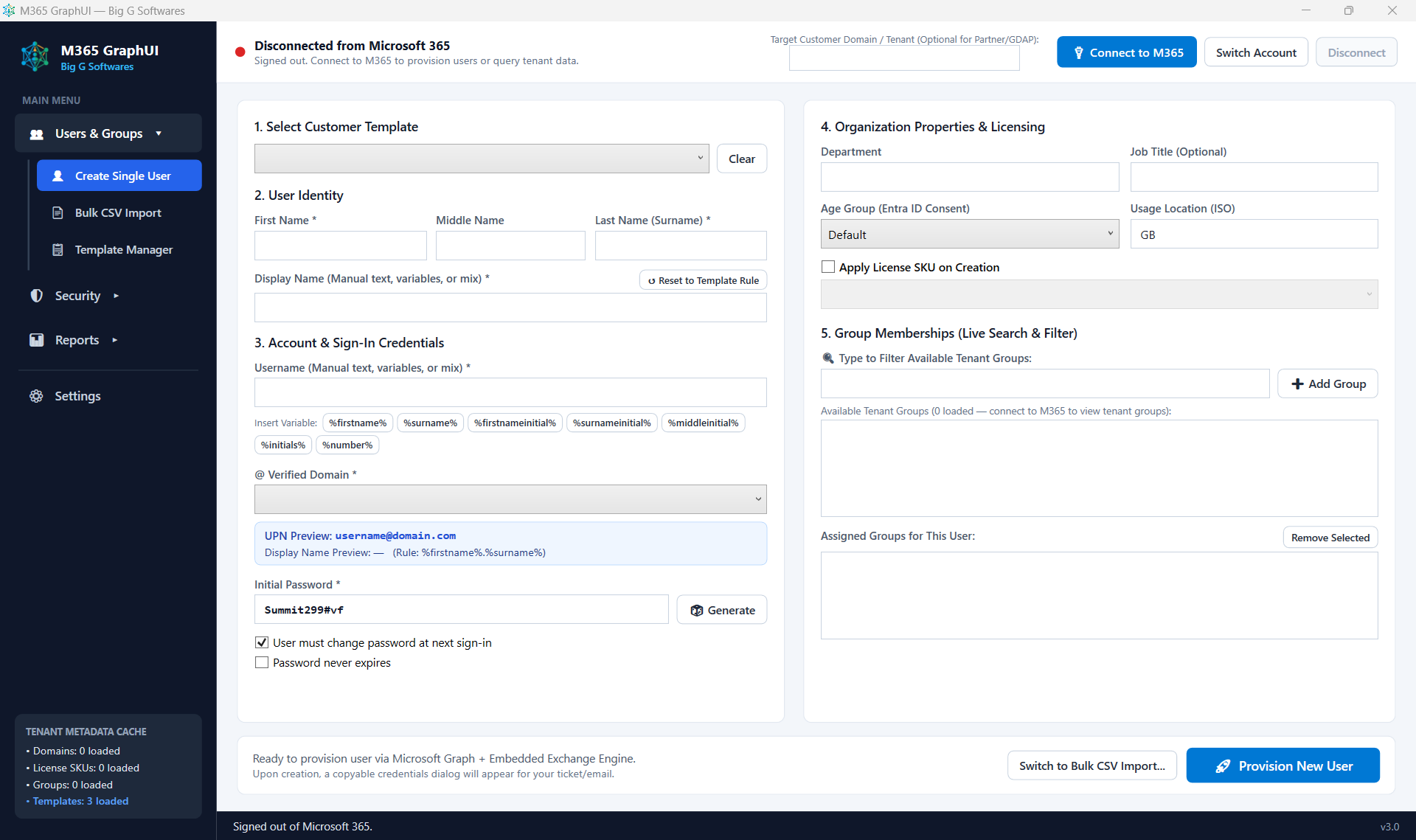
- Intelligent User Provisioning: Create single users or bulk-import hundreds of users via CSV with dynamic naming variables (
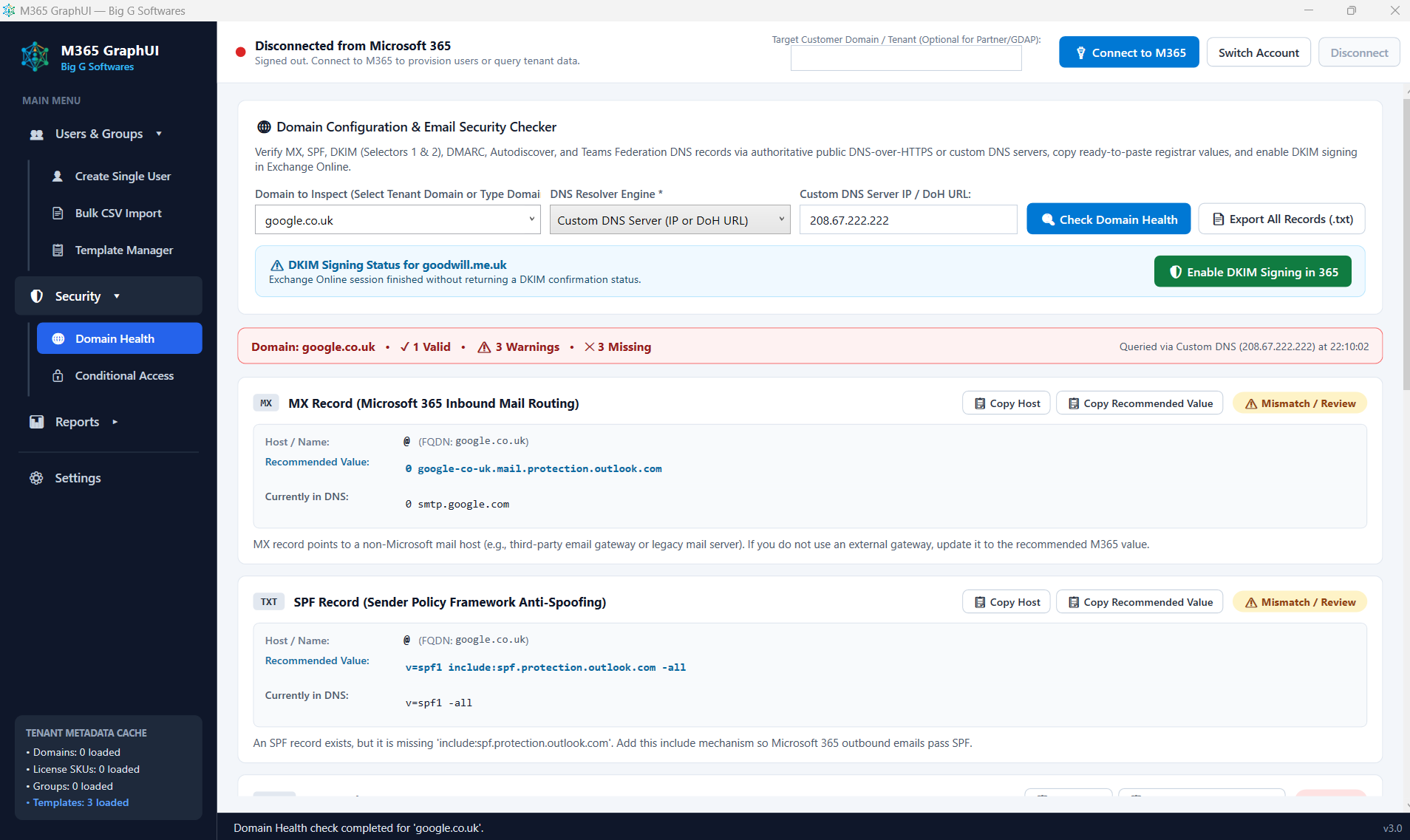
%firstname%,%surname%,%initials%,%number%), automatic collision handling, license assignment, and distribution list automation. - Domain Security & Health Checker: Verify public DNS configurations (MX, SPF, DKIM Selectors 1 & 2, DMARC, Autodiscover) using public DNS-over-HTTPS (DoH) or custom resolvers, export registrar configuration guides, and enable Exchange Online DKIM signing in one click.
- MFA Compliance Audit & Reporting: Audit directory-wide authentication status, detect accounts without MFA protection, inspect authentication methods (Authenticator, FIDO2/Passkey, SMS, OATH), and export executive CSV audit reports.
- Conditional Access & Named Locations Builder: Deploy baseline security policies (Enforce MFA, Block Legacy Auth, Require Admin MFA, Geo-Blocking) with built-in Break-Glass lockout guards, and manage Trusted IP Ranges and Country locations.
- MSP Team Templates & Security: Share standardized tenant configuration templates across your engineering team via OneDrive, SharePoint, or network shares with optional Administrator PIN protection.
System Requirements
Operating System: Windows 10 (64-bit), Windows 11 (64-bit), or Windows Server 2019/2022.
Runtime: Self-contained executable (.NET 8 runtime is bundled inside M365GraphUI.exe — no external .NET installation required).
PowerShell: PowerShell 7+ (pwsh.exe) and ExchangeOnlineManagement v3.0+ (used for Exchange Distribution Lists and DKIM activation; can be downloaded and installed automatically via the built-in Setup Wizard).
Network & Connectivity: Outbound HTTPS (port 443) connectivity to Microsoft Graph (graph.microsoft.com), Microsoft Identity (login.microsoftonline.com), and public DNS resolvers.
Microsoft 365 Permissions: A tenant administrator account (e.g., Global Administrator, User Administrator, or Privileged Role Administrator depending on operations performed). Conditional Access policy enforcement requires Microsoft Entra ID P1 / P2, Microsoft 365 Business Premium, or E3/E5 licensing.
Runtime: Self-contained executable (.NET 8 runtime is bundled inside M365GraphUI.exe — no external .NET installation required).
PowerShell: PowerShell 7+ (pwsh.exe) and ExchangeOnlineManagement v3.0+ (used for Exchange Distribution Lists and DKIM activation; can be downloaded and installed automatically via the built-in Setup Wizard).
Network & Connectivity: Outbound HTTPS (port 443) connectivity to Microsoft Graph (graph.microsoft.com), Microsoft Identity (login.microsoftonline.com), and public DNS resolvers.
Microsoft 365 Permissions: A tenant administrator account (e.g., Global Administrator, User Administrator, or Privileged Role Administrator depending on operations performed). Conditional Access policy enforcement requires Microsoft Entra ID P1 / P2, Microsoft 365 Business Premium, or E3/E5 licensing.
What's New in v3.0
What's New in M365 GraphUI v3.0
Core Architecture & Modernization
Full rewrite targeting .NET 8 (Windows x64) with native Microsoft Graph SDK integration and high-performance asynchronous operations.
Modern, responsive WPF interface featuring categorized sidebar navigation (Users & Groups, Security, Reports, Settings).
Native PowerShell 7+ engine with resilient prerequisite bootstrapper and multi-stage downloaders (supporting standalone machines behind SSL inspection).
User Provisioning & Dynamic Naming
Added dynamic naming variables: %firstname%, %surname%, %firstnameinitial%, %surnameinitial%, %middleinitial%, and %initials%.
Added sequential duplicate resolution variable (%number%), automatically incrementing usernames (e.g., jsmith2, jsmith3) when collisions are detected in Entra ID or CSV batches.
Added Middle Name support across single user forms, bulk CSV columns, and naming rules.
Mixed manual text and variables support with live typing previews and reset-to-template shortcuts.
Strict connected-tenant validation: domain, license, and group dropdowns filter strictly to items active in the connected directory.
Bulk CSV Import
Made the Password column optional: rows without a password automatically generate cryptographically secure random passwords matching single-user standards.
Added a 1-click "Clear" button with confirmation to quickly reset staged CSV datasets.
Enhanced batch progress reporting with real-time pass/warning/failure tracking.
Domain Configuration & Email Security Checker
7-point live DNS health inspector checking MX, SPF, DKIM Selector 1, DKIM Selector 2, DMARC, Autodiscover, and Teams Federation records.
Resolver selection support: query authoritative records via Cloudflare (1.1.1.1 DoH), Google (8.8.8.8 DoH), or Custom DNS servers (direct UDP/TCP port 53 or custom DoH).
Instant "Copy Host" and "Copy Value" helper tools per record card and 1-click "Export All Records (.txt)" for domain registrars.
Built-in Exchange Online DKIM activation: generate signing keys and activate DKIM directly from the UI.
MFA Compliance Audit & Reporting
Tenant-wide authentication audit scanner querying Microsoft Graph authentication registration details.
Live summary dashboard cards: Total Scoped Accounts, MFA Registration %, Protected Users, and At-Risk Users.
Multi-factor method breakdown: detects Microsoft Authenticator Push, FIDO2/Passkey, Software OATH TOTP, SMS, and Passwordless capability.
Quick filtering (Active Members, Guests, Disabled, Unregistered Only) and 1-click CSV report export.
Conditional Access Builder & Custom Locations
Built-in Entra ID P1/P2 license detection and advisory banner.
4 One-Click Security Policy Presets:
Require MFA for All Users (with Trusted Location & Break-Glass exemptions)
Block Legacy Authentication (POP3, IMAP4, SMTP Basic Auth, MAPI)
Require MFA for Administrative Roles (Global, Security, Exchange, User Admins)
Block Sign-Ins from Untrusted Countries / Locations (Geo-Blocking)
Built-in Break-Glass Lockout Guard: enforces selecting at least one excluded administrator before policy creation.
Policies default to Report-Only mode with a 1-click toggle for immediate enforcement.
Custom / Named Locations Manager: create and manage Trusted IP Ranges (CIDRs) and Country/Region definitions.
Installation & Usage Instructions
Deployment & First Run
- Zero-Install Portable Application: Download
M365GraphUI.exeand place it in any folder on your machine (e.g., Desktop, Documents, or your administrative toolbox). No installer or administrative rights are required to run the core executable. - First-Run Setup Wizard: On initial launch, M365 GraphUI presents a guided 4-step configuration wizard:
- Step 1 (Prerequisites): Checks for PowerShell 7+ and the
ExchangeOnlineManagementmodule. If missing, click Download & Install Prerequisites to set them up automatically. - Step 2 (Operating Mode): Select between MSP / Multi-Tenant Mode (for IT providers managing multiple customer directories) or Single Organization Mode (for dedicated in-house IT).
- Step 3 (Authentication): Choose between the built-in Microsoft identity connector (zero-configuration) or 1-click automatic creation of a dedicated Entra ID App Registration.
- Step 4 (Shared Storage & Security): (Optional) Point to a shared
templates.jsonfile on a synced SharePoint library or network folder and configure an optional Admin PIN.
Daily Usage
- Connecting to a Tenant: Enter your target customer domain (optional for Partner/GDAP access) and click 🔌 Connect to M365. Authenticate in the browser window using your Microsoft 365 administrator account.
- Creating Users: Navigate to Users & Groups → Create Single User, select a saved customer template or populate identity details manually, review the live credentials preview, and click 🚀 Provision User Now.
- Bulk Import: Navigate to Users & Groups → Bulk CSV Import, click Browse CSV File, map your columns, review the generated preview (passwords auto-generate if blank), and click Execute Bulk Provisioning.
- Checking Domain Health: Navigate to Security → Domain Health, pick a domain, select your preferred DNS resolver (Cloudflare, Google, or Custom DNS), and click 🔍 Check Domain Health.
- Auditing MFA: Navigate to Reports → MFA Audit, click 🔍 Run MFA Audit Scan, review the metrics and at-risk accounts, and export to CSV.